Back to AppHub
THE ULTIMATE CONTROL DECK

Your iPhone / iPad becomes the ultimate control deck for Mac and Windows. 30 built-in app presets, zero setup required. Audio, MIDI and OBS — all from a single screen.

iOS 16+ / iPadOS 16+ · macOS 13+ · Windows 10/11

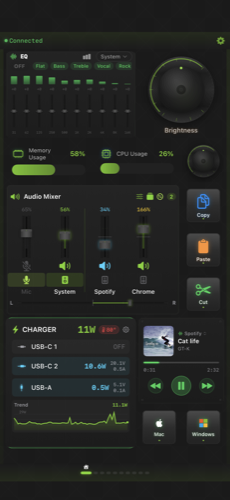
StreamPad のメインダッシュボード
[ 01 ] FEATURES

Control everything with a fingertip.

Streaming, video editing, music production and everyday work — pro-grade control, packed into one app.

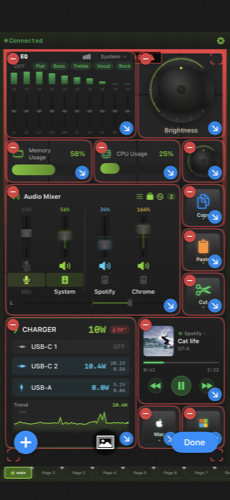
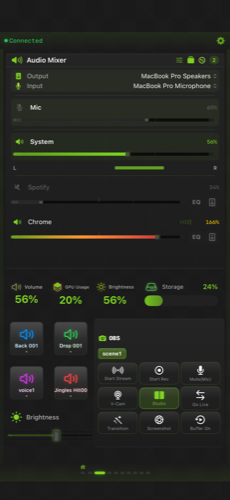
StreamPad audio mixer screen
01 AUDIO MIXER

Audio Mixer

Per-app volume from 0 to 200%, with a 10-band EQ and a real-time spectrum analyzer.

  • Per-app volume, mute & output device
  • Overdrive up to 200%
  • 10-band graphic EQ
  • Magic Boost auto-optimizes loudness
  • Output Groups for multi-device output
  • Microphone & input monitoring
StreamPad MIDI controller editor
02 MIDI CONTROLLER v1.3 NEW

MIDI Controller

Map dials, faders and buttons to MIDI CC and notes — drive your DAW by hand.

  • Dial / fader → MIDI CC (0–127)
  • Button → MIDI Note on / off
  • All CC numbers · 16 channels (Pro)
  • 14-bit pitch bend / program change (Pro)
  • Ableton, Logic, FL, GarageBand presets
  • Bidirectional feedback (Pro)
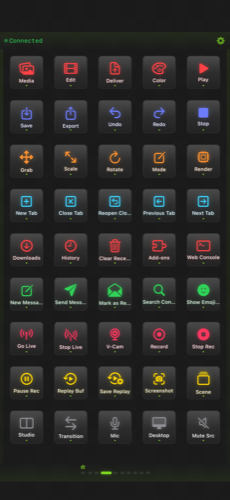
StreamPad shortcuts / OBS control screen
03 OBS STUDIO

OBS Studio Integration

WebSocket v4 / v5 support. Scene switching, going live, and 20+ commands at hand.

  • Scene switching
  • Start / stop streaming & recording
  • Toggle source visibility
  • Switch filters
  • 20+ OBS commands
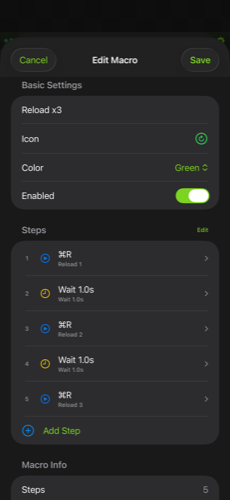
StreamPad macro configuration screen
04 MACRO

Macro Automation

Record key operations and replay complex workflows with a single tap.

  • Record & replay key sequences
  • Insert delays
  • Loop support
  • Collapse routines into one tap
StreamPad layout editor screen
05 CUSTOM LAYOUT

Custom Layout

Buttons, dials, touch strips, gauges, folders and music widgets — build your own deck.

  • Buttons / dials / touch strips
  • Gauges / folders / music widgets
  • Custom device names & icons
  • Music control (Apple Music / Spotify / Chrome)
  • Auto profile switch by active Mac app (Pro)
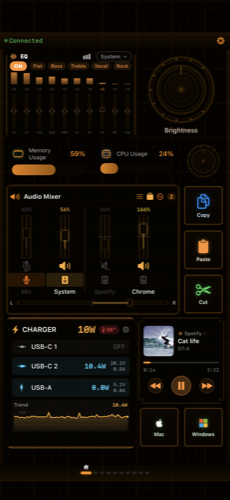
StreamPad theme selection screen
06 18 THEMES

18 Design Themes

From Cyberpunk to Nixie tubes — dress your deck to match your mood and your work.

  • Cyberpunk / Neon / Retro
  • Wood / Nixie tube / Ice and more
  • All 18 themes (some free)
  • Real-time power from BLE chargers (e.g. Anker)
[ 02 ] APP PRESETS

30 apps, ready to go.

Presets pre-optimized for pro-grade apps. Use them from day one — no setup needed.

30 built-in presets
Video & Streaming
Final Cut Pro Premiere Pro DaVinci Resolve After Effects OBS Studio
Design & Photo
Photoshop Lightroom Blender
Music & Audio
Logic Pro Ableton Live Spotify Music
Browser
Safari Chrome Firefox
Communication
Discord Zoom Teams Slack Messages
Dev & Productivity
VS Code Xcode Terminal Mail Notes Reminders Photos Calendar Finder System Settings
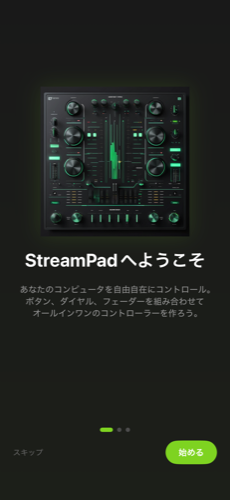
StreamPad のオンボーディング画面
[ 03 ] SETUP

Up and running in 3 steps.

No complex setup. Just join the same Wi-Fi and pair automatically.

01

Get the app

Download StreamPad from the App Store (iOS 16+ / iPadOS 16+).

02

Install Companion

Install the free Companion app on Mac (macOS 13+) or Windows (10 2004+ / 11).

03

Connect over Wi-Fi

Put both on the same Wi-Fi and they pair automatically.

[ 04 ] PRICING

All core features are free.

Start free with every core feature. Pro unlocks the limits and removes ads.

Free

Every core feature, free

Pro UPGRADE

Unlocked limits, ad-free

Audio Mixer
  • Basic volume / mute
  • Per-app output device
  • Spectrum analyzer
  • Overdrive (up to 200%)
  • 10-band EQ / Magic Boost
  • Output Groups / input monitor
  • Sample rate settings
MIDI Controller
  • Dial / fader / button basics
  • 4 main CCs
  • All CCs (0–127)
  • 16 channels
  • Pitch bend / program change
Controls & Integrations
  • OBS integration
  • 30 app presets
  • 18 themes (partial)
  • Shortcuts / webhooks
  • Auto profile switch
  • Template management
  • All 18 themes
  • Ad-free

Ads appear in the free version only. Buy the in-app “Remove Ads” to hide them completely.

[ 05 ] DOWNLOAD

Get started now.

The iPhone / iPad app, plus the free Companion app. Grab both and you're ready.

[ 06 ] FAQ

Frequently asked.

How do I connect to OBS Studio? +
Install OBS Studio 28+ and enable the WebSocket server. Note the port (default 4455), enter ws://localhost:4455 in the StreamPad Companion settings, then save and test the connection.
Is StreamPad free? +
Yes — all core features are free to use. Pro unlocks advanced audio / MIDI features and removes ads.
Is Windows supported? +
Yes. The Windows Companion (.NET 8) is available for free and runs on Windows 10 (2004+) and Windows 11.
How do I set up the MIDI controller? +
MIDI is macOS Companion only. A virtual MIDI device is created automatically, so set the action type to MIDI and assign CC / note numbers. Windows support is coming soon.

Turn your device into the ultimate deck.

Free to download. Let's get started.